Friday, April 30, 2010

List Items to eBay with Your Apple iPad - New eBay Selling App from GarageSale

List Items to eBay with Your Apple iPad - New eBay Selling App from GarageSale

New for the iPad is GarageSale, an eBay Selling App by iwascoding

GarageSale for the iPad
iPad users can create and list eBay auctions direct to eBay without ever turning on their desktop computer with GarageSale.

GarageSale for the iPad allows sellers to use existing images from their photo library, add an item description and specify required eBay settings (category, item attributes, return policy and shipping terms), all from their iPad.

Features:

  • Free image hosting
  • Pre-designed eBay listing templates
  • Add images from your iPad to eBay
  • Preview and approve listings before uploading them to eBay
  • Retrieves real-time fee information from eBay
  • eBay category and attribute data updates are automatically updated to keep you current
  • GarageSale supports 16 different eBay sites including eBay.com, eBay Motors US, eBay.ca, and eBay.de

Check out GarageSale for the iPad now! Available for USD $4.99/ EUR 3.99 from the iTunes App Store.

GarageSale is an eBay selling solution for Mac users, developed by iwascoding. iwascoding is a German company and experienced eBay Developer at the forefront in developing tools to make eBay selling and buying easier for Mac, iPhone and now iPad users.

Monday, April 12, 2010

How to Source Products to Sell on eBay from Multiple Wholesalers by Worldwide Brands


Article by Worldwide Brands - this is a series of 14 blog posts providing information on how to find inventory and products to sell on eBay from wholesalers with Worldwide Brands and their Product Sourcing Tool for eBay.

Blog 13: Handling low inventory for eBay Selling

Once you determine your niche and find a wholesale supplier who will support you selling on eBay, it becomes the responsibility of the seller to check the inventory levels of the supplier before posting a new listing. What do you do when you find that your wholesale supplier is running low on your most popular inventory items – or any item for that matter?

Find Alternative Sources for the Same Wholesale Product
You need to have a backup source of supply. But how do you find other suppliers offering the same brands or products – or suitable substitutes that you can list when you suspend your normal listing. eBay provides help from one of eBay’s Certified Solution Providers: WorldwideBrands.com. You can now purchase access to the Worldwide Brands Product Sourcing Tool in the Selling Manager area of ‘My eBay’. This wholesale database contains the contact details for more than 8,000 certified wholesale suppliers including drop shippers, volume wholesalers, light bulk wholesalers, liquidators and importers who together represent more than 8,000,000 products.


Find an Alternative Wholesale Supplier
You can search the database by product, product category, and brand to find alternative wholesalers who will supply the same product. It is a good practice to open an account with this alternative supplier. It is also a good practice to make a test order from the supplier so that you can verify the quality of the product is to your standards, and test the wholesale supplier’s packaging and shipping methods.

Secure Alternatives before You need Them
Without a Tool like this, you may spend many hours trying to find alternative sources of supply. It’s important to have an established relationship in place with an alternative supplier before you need them. It’s too late to start trying to set up an account with an alternative wholesaler when you have orders in hand and your regular supplier cannot fulfill orders for you.

If drop shipping, make sure to keep some inventory on hand, especially for top selling items.
At some point, you will run into an out of stock situation with a supplier for a particular product, it is strongly recommended that you keep a few items on hand to prevent any delay in shipment to your customer. Any remaining listings can then be turned off to prevent any further orders.

Being an online retailer requires constant attention to product sourcing, right priced buying and delivering excellent buying experiences. Product Sourcing is a continual but easy process when done correctly.


Check out Worldwide Brands Product Sourcing Tool for eBay today! A 7 Day Free Trial is available.

Worldwide Brands is an eBay Certified Service Provider, providing product sourcing access and information for eBay sellers. They are the publishers of an extensive directory of legitimate, fully-verified ecommerce wholesalers and manufacturers.

Friday, April 9, 2010

4 Surefire Ways to Make More Money on eBay This Spring

Blog post by Lisa Suttora, CEO & Founder of WhatDoISell.com

4 Surefire Ways to Make More Money on eBay This Spring


Spring has sprung and so have online sales! We’ll be hearing about the March ecommerce sales figures in the coming weeks, but early indicators reveal that an early Easter and the arrival of spring weather will bring a boost of online retail sales in the neighborhood of 8-10% over 2009.

For eBay sellers, spring also brought with it some major changes to the way business is transacted on eBay. With the end of the Store Inventory Listing Format, millions of items formerly nestled away in eBay stores, saw the dawn of a new day in eBay’s core search.


For many eBay sellers, the inclusion of “store in core” has been a boon for sales. Many people are finding that inventory they’ve had sitting on their virtual store shelves for two years is now selling.


Other sellers who had enjoyed a sole position in core, while their competitors left their listings in store, have seen their categories explode with many competing products alongside theirs where none were before.


But there’s no doubt about it. No matter what changes you’ve seen in your sales on eBay over the past week or so, with the eBay changes and the arrival of spring, it’s time to refresh your strategy!


Today we’re going to look at 4 ways to get started doing just that!


1. Put Your Spring and Summer Merchandise Front and Center


Walk into any brick and mortar retailer these days and you’ll see the signs of spring. Brightly colored signs, spring products in the hot new colors and a fresh array of merchandise to choose from. Spring is a time or renewal and rebirth, and people are wired for that. They’re also very ready to make new purchases for spring and summer. And the eBay seller who actively markets their spring and summer products is the one who increases their sales! Unfortunately, I see many eBay stores and listings that are not doing any spring marketing at all. Even worse, holiday messages and graphics remain. Fall and winter categories are featured in stores and spring merchandise is buried in sea of fall and winter products.


Take a look at your store and listings. Will customers be excited by what they see when they land on your eBay pages?


2. “Top Up” Your Store Categories


If visitors to your eBay store can’t find your new merchandise, they won’t become buyers. And part of putting your new spring merchandise front and center is rearranging your eBay store categories so that the new in-season categories are featured at the top. Many people list their categories in alphabetical order, but by doing that, you relegate your Spring and Summer merchandise to the bottom of your category list where no one will find it!


Keep in mind that a shopper’s focus is going to be “above the fold” which means you have to engage them with what’s on their screen BEFORE you can get them to scroll down to see what else you are offering. Always put your most popular 5 or so eBay store categories and in-season categories at the top of your store category list. If you have a lot of categories, once you feature your top 5-7 categories you can continue your category list alphabetically.


3. Use Subtitles for Marketing not Product Details


eBay subtitles are the best marketing deal on the web IF you use them for the right purpose. eBay listing subtitles should be used for one thing only – MARKETING. Think of eBay listing subtitles as the banner you hang outside your store or the sign you place on a product that tells people what makes that product different, unique or special than everything else the customer is being offered.


Two important things that every eBay seller must know. eBay listing subtitle keywords are not included in core search, this means that if you are putting item specific keyword data into your subtitle in the hopes that it will help people find your products, it does not contribute at all to that purpose.


For marketing purposes you want to craft what we call in marketing a USP (Unique Selling Position) or a “headline” – that will make people do ONE thing… and that is CLICK on your listing and go to your listing description page.


A listing subtitle has ONE purpose – to get a prospective buyer to CLICK on your listing and go to your listing description page where you then display the product information that will convert that browser into a buyer!


So what should go in your listing subtitle? Anything that showcases what’s different about your product or service. The thing that sets you apart from every other seller. Maybe, you’re selling a “Limited Edition Platinum Retro 60 Series”. Maybe your product is an “Exclusive Set. Only Available on eBay”. Maybe you are fortunate to carry an item that is “In Stock with Same Day Shipping. Sold Out In Stores”. Maybe your item is “Eligible for Bing Cashback”. Or the product your carry is “Winner of the Top 10 Toy Awards”. In many categories these days “We Ship Worldwide” is a USP – there are a lot of eBay sellers who no longer ship worldwide. (Which is the subject for another blog post.) Or your item is “100% Made in the USA”.


4. Use eBay’s Search Visibility Analysis Tool to test and track your strategies


The most important key to success when running a business on eBay or anywhere else is to know what works for your business. Each business has so many variables to it, that you have to apply the strategies and then test them and track them to make sure that they are right for you. eBay’s Search Visibility Analysis Tool will help you test and track changes you make to your listings as well as view the impact they have on your ranking in eBay’s Best Match. For example, the tool will show you how many times your listing has been displayed to buyers and the number of times a buyer has clicked-through to view your listing description. This information is critical to determining why your listings are or are not selling. If shoppers aren’t clicking on your listing, they definitely aren’t buying. With the Search Visibility Analysis Tool, you can pinpoint where the problem in the process is and make changes accordingly.


We’ll we’ve just covered four solid business strategies to increase your sales this spring. There’s only one thing left to do now… apply what you’ve learned and implement!


This article has been condensed. Read the full article here.


Since 2004, Lisa Suttora of WhatDoISell.com has provided thousands of online sellers with the skills, knowledge and support they need to build a unique, thriving business on eBay.

Wednesday, April 7, 2010

Cloud Conversion Provides a Complete CRM Solution for eBay Sellers as New eBay Certified Provider

New eBay Certified Provider, Cloud Conversion


We are delighted to offer eBay sellers a robust CRM solution for customer service and management with the addition of Cloud Conversion as a new eBay Certified Solutions Partner.


eCommSource by Cloud Conversion is a complete CRM (Customer Relationship Management) solution for eBay built upon salesforce.com’s trusted Force.com platform. With eCommSource, top eBay sellers can manage all customer service and support from a single view, gain valuable insight about their top buyers and implement effective marketing strategies to increase sales with repeat purchases.

eCommSource is a solution for any online retailer who is serious about providing excellent customer service and support. It is appropriate and cost effective for any size company. eCommSource really opens the door for eBay sellers who are serious about customer service to leverage customer relationship management (CRM).” – Jon Jessup, CEO of Cloud Conversion

Features:

  • Consolidate all eBay buyer emails from multiple eBay accounts
  • Streamline and simplify your customer support process
  • Process and answer buyer emails from eBay and other online channels
  • Track buyer questions and concerns for resolution
  • Route inquiries to the right employee or department (i.e. returns to the shipping dept)
  • Buyer questions specific to an eBay auction include Auction Ending Time for response prioritization
  • Manage and track customer returns and RMAs (return merchandise authorizations)
  • Access other CRM applications from the AppExchange®

Benefits:

  • Improve customer service with faster response time
  • Boost eBay feedback, DSRs and sales
  • Increase customer retention
  • Analyze buyer activity by product to help forecast sales, hot products and sourcing
  • And more…

Try a Free 30-Day Trial to eCommSource

Visit http://certifiedprovider.ebay.com/ to learn more about eBay Certified Providers and the services and solutions they offer to help an eBay seller grow their business.

Monday, April 5, 2010

Use Research to Understand Your Competition and Improve eBay Sales by Vendio

Article from Vendio's Vendable Blog

Understand, then Challenge your eBay Competition

Recent eBay changes are now including eBay Store inventory in the main or core search. With this change, it is much more important to understand your competition on eBay. Remaining (or becoming) competitive is truly the only way to achieve success when selling commodity items.

For one-of-a-kind items, auctions still remain the best bet, but for commodity items, you’ll need to stand out from the crowd.

To understand your competition, it's all about research..research and research.

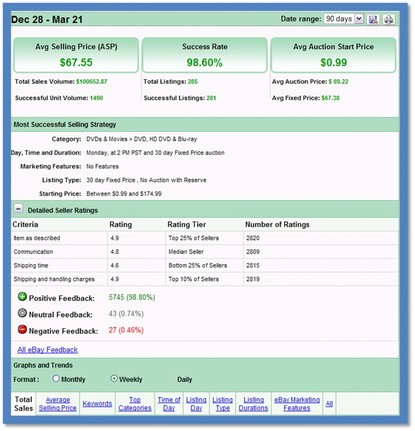
Vendio Research provides competitive data on a seller or product level and it’s a great place to start when developing your competitive strategy.

On a product level (researching by product), you’ll be able to view at a glance all the pricing data and recommendations for listing successfully. In addition, you can view keywords that should be used to drive a products success (what terms are buyers using to FIND the product) and on a competitive level, you’ll be able to see the top sellers by product and view the details on what makes them successful. This will give you great insight. Find out when and how they are listing their items and at what price. Do they charge shipping or offer free shipping? Use the information to create a listing strategy that really works for your product.


In addition to product research, you can type in your competitor’s eBay user ID to get the same great information on a seller level (vs. a product level). You can view their overall strategy and see what’s really driving their success.

I can’t show all the graphs that are available (or this blog post would be loaded with Images). However, you can see from the image that you can view the graphs and trends for many different areas (average selling price, keywords, time of day, categories, etc.).

While Research gives you the “numbers and data”, it does not account for the other reasons a seller may or may not be successful, such as customer service, attractiveness of the listing and policies.

Use Research to actually look at the successful listings and determine how you can improve on what you see.

Can you make your policies friendlier? Can you make your ads more readable? Can you make your ads more attractive. Go into your competitors ads with a “red pencil” and then do the same for you own ads.

There is always room for improvement and better methods to convert browsers to bidders and buyers; it just takes a bit more work than it used to.

And one final recommendation, if you go through the process of researching and understanding your competition – don’t stop there. Make it a part of your normal weekly, bi-weekly or monthly process. Doing it once is great, doing it regularly ensures you can always stay ahead of the “next” curve.

Happy Selling!!

An eBay Certified Solutions Provider since 2004, Vendio provides an ecommerce solution for eBay sellers of all sizes. Vendio offers a series of applications which can be installed on a standalone basis or used to extend the functionality of the Vendio's eBay listing and inventory management solution.

Friday, April 2, 2010

eBay Workshop April 7th - "eBay Listing Design Clinic"


Host: Debbie Levitt, CEO of As Was

Date: Wednesday, April 7th

Time: 11a.m. - Noon PST

Description: In this workshop, Debbie Levitt, CEO of As Was (an eBay Certified Provider since 2004), will take a look at one listing from workshop participants, and offer free advice on how to make that listing more likely to make a sale.

She'll be looking at design, layout, pictures, description, policies, and more ingredients that go into converting eBay shoppers into buyers.

Visit http://certifiedprovider.ebay.com/ to learn more about eBay Certified Providers and the services and solutions they offer to help an eBay seller grow their business.

Thanks,

Ginger